Proactive IT support services reduce downtime by identifying and resolving potential issues before they cause system failures, outages, or productivity losses. Instead of waiting for something to break, proactive support uses continuous monitoring, regular maintenance, predictive analytics, and tested backup systems to keep your business running smoothly. This approach typically reduces unplanned downtime by 50-85% compared to traditional break-fix models.
Most businesses don’t realize how much downtime actually costs them until they add up the numbers. Lost productivity, missed deadlines, frustrated employees, and damaged customer relationships all stem from IT systems that fail unexpectedly. IT support services have evolved significantly over the past decade, and modern managed IT providers now offer monitoring tools, automated maintenance routines, and predictive capabilities that catch problems days or weeks before they impact operations.
Wondering if your current IT setup is leaving you vulnerable to preventable downtime?
IT-Solutions Canada has been helping Canadian businesses identify infrastructure gaps since 2007. Our comprehensive it security assessment examine your systems, workflows, and recent incidents to show exactly where you stand.
What Is Proactive Managed IT Support?
Proactive managed IT support is a service model where your IT provider continuously monitors, maintains, and optimizes your technology environment to prevent problems rather than simply responding when things break. This approach represents a fundamental shift from reaction to prevention.
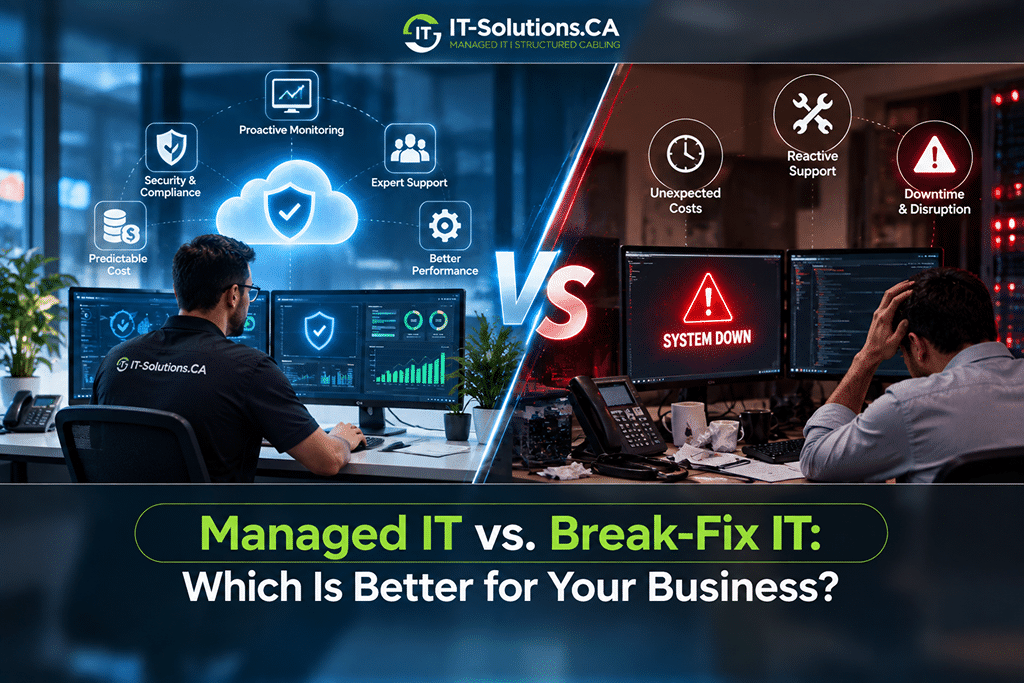
| Aspect | Break-Fix IT | Proactive IT Support |
| Approach | Wait for problems | Prevent problems |
| Monitoring | None or minimal | 24/7/365 continuous |
| Maintenance | When things fail | Scheduled and planned |
| Response time | Hours to days | Minutes to hours |
| Downtime | Frequent and unpredictable | Rare and minimized |
| Costs | Unpredictable spikes | Stable monthly fees |
| Typical uptime | 95-98% | 99.9%+ |
The difference matters enormously for business operations because managed services IT support providers using proactive methodologies typically guarantee 99.9% or higher uptime. Businesses relying on break-fix support, by contrast, often experience dozens of hours of unplanned downtime annually.
Did You Know? According to Gartner research, the average cost of IT downtime is $5,600 (or CAD 7706) per minute for mid-sized businesses. Even a single hour of unplanned downtime can cost more than an entire year of proactive monitoring services.
How Proactive IT Support Reduces Downtime
Proactive IT support uses specific techniques and technologies to catch problems early, maintain system health, and ensure rapid recovery when incidents do occur.
24/7 Monitoring and Early Issue Detection
Round-the-clock monitoring forms the foundation of proactive IT support because problems don’t wait for business hours. Specialized software watches your servers, networks, endpoints, and applications continuously, looking for warning signs that indicate developing problems.
What monitoring systems watch for:
- Disk errors or failing storage drives
- High CPU or memory usage indicates overloaded systems
- Unusual network traffic patterns suggesting security threats
- Application errors and crash patterns
- Backup job failures or incomplete runs
- Certificate expirations approaching
When monitoring detects anomalies, alerts go immediately to support teams who can investigate and intervene. A disk showing early signs of failure gets replaced during a planned maintenance window rather than crashing during your busiest period. This early intervention prevents the cascading failures that cause extended downtime.
Regular Maintenance, Patching, and Updates
Many outages stem from neglected maintenance rather than sudden hardware failures. Operating systems, applications, firmware, and security software all require regular updates to function reliably and securely.
| Maintenance Task | Frequency | Purpose |
| Security patches | Weekly/Monthly | Close vulnerabilities |
| Application updates | As released | Fix bugs, add features |
| Firmware upgrades | Quarterly | Improve hardware stability |
| Database optimization | Monthly | Maintain performance |
| Log file cleanup | Weekly | Prevent storage issues |
| Hardware diagnostics | Monthly | Catch failing components |
The key advantage is that scheduling updates happens during planned maintenance windows rather than disrupting business hours. IT support companies Toronto businesses rely on understand that a server reboot at 2 AM causes zero productivity loss, while the same reboot at 2 PM costs hours of employee time.
Did You Know? Microsoft releases security patches on the second Tuesday of every month (“Patch Tuesday”). Proactive IT providers test these patches before deploying them, preventing update-related crashes that plague businesses managing their own IT.
Predictive Analytics and Capacity Planning
Modern proactive IT goes beyond monitoring current conditions to forecasting future problems. Performance data collected over weeks and months reveals trends that indicate upcoming issues, allowing intervention before problems materialize.
Predictive capabilities include:
- Storage forecasting: Predicting when you’ll run out of space
- Hardware lifecycle tracking: Identifying equipment approaching end-of-life
- Bandwidth analysis: Spotting congestion trends before they impact performance
- License management: Forecasting when you’ll need additional licenses
- Seasonal planning: Preparing for predictable busy periods
This forward-looking approach means replacing aging servers before they fail and upgrading capacity before constraints slow everyone down. IT managed service providers in Toronto use these analytics to help businesses anticipate technology needs and plan investments more effectively.
Disaster Recovery, Backup, and Business Continuity
Even the best prevention can’t eliminate every possible incident. Hardware can fail unexpectedly, natural disasters happen, and human errors occur. Proactive IT support includes comprehensive preparation for these scenarios.
Disaster recovery elements:
- Automated backup routines with verification testing
- Off-site and cloud backup copies
- Documented recovery procedures
- Regular recovery testing and drills
- Failover systems for critical applications
Organizations with tested recovery plans restore operations in hours. Those without plans scramble for days or weeks if they recover at all.
How Proactive IT Support Boosts Productivity
Preventing downtime delivers obvious benefits, but proactive IT support improves productivity in ways that go far beyond simply keeping systems running.
Stable Systems and Fewer Interruptions
Reliable technology lets employees focus on their actual jobs instead of wrestling with IT problems or waiting for fixes. This stability creates compounding benefits because every prevented interruption preserves focus, momentum, and morale.
| Impact Area | Unstable IT Environment | Proactive IT Support |
| Task completion | Frequent delays | Consistent progress |
| Project timelines | Often missed | Usually met |
| Employee morale | Frustrated, stressed | Confident, focused |
| Customer service | Interrupted | Smooth and reliable |
| Collaboration | Disrupted by outages | Flows consistently |
The psychological impact matters to employees working with unreliable technology, who experience frustration and declining morale. Managed IT support services Toronto companies provide help eliminate this technology anxiety, letting teams concentrate fully on their work.
IT-Solutions Canada provides 24/7/365 proactive monitoring with Canadian-based technicians who respond quickly when issues arise. Give us a call if you have any queries.
Faster Response and Resolution When Issues Arise
Continuous monitoring means support teams often know about problems before users do. This early awareness dramatically shortens the time between issue occurrence and resolution.
Example Proactive response timeline:
- 9:03 AM: Monitoring detects an anomaly
- 9:03 AM: Alert reaches support team
- 9:05 AM: Technician begins investigation
- 9:12 AM: Root cause identified
- 9:18 AM: Fix implemented remotely
- Many issues can be resolved before users notice any disruption
Compare this to reactive support, where users must notice problems, report them, then wait for diagnosis and repair. The best managed services IT support providers resolve many issues before they impact anyone.
Enabling New Tools and Smarter Ways of Working
Proactive IT support doesn’t just maintain existing systems. It creates the stable foundation needed to adopt new technologies safely. Organizations with chaotic IT environments hesitate to implement improvements because they fear adding complexity to already unstable systems.
What proactive support enables:
- A stable foundation for secure cloud applications
- Smooth collaboration across existing tools
- Preparation for automation initiatives
- Support for remote work infrastructure
- Integration readiness for new software
Businesses stuck maintaining unstable legacy systems fall behind competitors who leverage new capabilities. Proactive IT support transforms technology from a constraint into an enabler.
Additional Business Benefits of Proactive IT Support
Beyond downtime reduction and productivity gains, proactive IT support delivers strategic advantages that impact overall business performance.
Stronger Cybersecurity and Risk Reduction
Security threats evolve constantly, and reactive approaches leave dangerous gaps between vulnerability discovery and protection. Proactive IT support integrates security into ongoing operations.
Security elements in proactive support:
- Continuous vulnerability scanning
- Immediate security patch deployment
- Real-time threat monitoring
- Suspicious activity detection and response
- Compliance maintenance and documentation
A cybersecurity services company integrated with your IT support provides layered protection that reactive approaches cannot match. The best cybersecurity IT companies in Toronto understand that security and IT support must work together because isolated tools leave gaps that attackers exploit.
Predictable IT Costs and Better Resource Planning
Break-fix IT creates budget chaos. One month costs almost nothing, while the next brings emergency expenses costing thousands. Proactive support transforms this unpredictability into stable, plannable expenses.
| Cost Factor | Break-Fix Model | Proactive Model |
| Monthly fees | Unpredictable | Fixed and stable |
| Emergency repairs | Frequent, expensive | Rare |
| Hardware replacement | Rush pricing | Planned purchasing |
| Downtime losses | Significant | Minimal |
| Budget planning | Impossible | Straightforward |
This predictability helps businesses plan growth, allocate resources effectively, and make strategic technology investments rather than reactive emergency purchases.
Want predictable IT costs instead of budget surprises?
IT-Solutions Canada offers transparent managed IT support with clear monthly pricing and no hidden fees. We help businesses across Toronto, Vancouver, Calgary, and Montreal align IT investments with growth, with over 10,000 projects.
Implementing Proactive IT Support in Your Organization
Transitioning to proactive IT support requires thoughtful planning to maximize benefits and minimize disruption.
Assessing Your Current IT Environment
Before implementing proactive measures, you need a clear understanding of your starting point. A thorough assessment reveals gaps, risks, and priorities that should guide implementation decisions.
Assessment should cover:
- Current infrastructure inventory
- Recent incident history and patterns
- Existing monitoring and maintenance practices
- Backup and recovery capabilities
- Security posture and vulnerabilities
- User satisfaction and pain points
IT support services providers typically offer assessment services that document your environment comprehensively and identify where proactive measures will deliver the most value.
Priority areas to address first:
| Priority | Focus Area | Why It Matters |
| 1 | Critical systems | The highest business impact when they fail |
| 2 | Recurring problems | Indicates underlying issues needing root cause fixes |
| 3 | Security gaps | Unacceptable risk exposure |
| 4 | Quick wins | Immediate value with minimal effort |
| 5 | Long-term needs | Infrastructure requiring replacement or upgrade |
Takeaway
Proactive IT support fundamentally changes the relationship between businesses and their technology by prioritizing prevention over reaction. Instead of enduring unpredictable failures and emergency repairs, organizations gain stable systems, predictable costs, and confidence to focus on business goals.
Take control of your technology before issues arise. IT-Solutions Canada delivers proactive IT monitoring and support that keeps your systems secure, your network running smoothly, and your business ahead of downtime. Speak with certified Canadian technicians, get a full IT assessment, and implement solutions tailored to your environment. Stay protected, stay productive, and let IT‑Solutions Canada handle the technology so you can focus on growing your business.
Frequently Asked Questions
How can proactive IT services boost employee productivity?
Proactive IT keeps systems stable and resolves issues in the background, so employees work without frequent tech delays. Consistent technology performance improves focus, morale, and output.
What types of tasks are included in proactive IT maintenance?
Proactive maintenance includes patching, updates, hardware health checks, performance monitoring, backup verification, capacity planning, and security scanning to keep systems running optimally.
Is proactive IT support more cost-effective than break-fix service?
Yes, proactive support prevents expensive emergencies, reduces downtime losses, and converts unpredictable repair bills into stable monthly costs that are typically lower overall.
Do small and mid-sized businesses really need proactive IT support?
SMBs benefit significantly because proactive support provides enterprise-level monitoring and protection they can’t maintain in-house, helping them stay reliable and competitive.
Author Profile

- Dedicated IT specialist with expertise in system administration, network security, and troubleshooting. Skilled at leveraging emerging technologies to boost efficiency, reduce risks, and ensure seamless IT operations while empowering teams to achieve their goals.
Latest entries
 BlogsOctober 14, 2026Managed IT vs. Break-Fix IT: Which Is Better for Your Business?
 BlogsOctober 13, 2026How Much Does A Microsoft 365 Security Audit Cost?
 BlogsSeptember 25, 2026How Often Should a Business Conduct a Cybersecurity Risk Assessment?
 BlogsSeptember 24, 2026How to Prepare Your Business for a Microsoft 365 Migration